⭐ 1005 Stars
🍴 144 Forks
👀 1005 Watchers
Kotlin
apache-2.0
| GitHub 链接 | https://github.com/platonai/Browser4 |
|---|---|
| 项目简介 | Browser4: a lightning-fast, coroutine-safe browser for your AI. |
| 创建时间 | 2018-03-12 |
| 更新时间 | 2026-02-14 |
📖 README
English
# 🤖 Browser4
[](https://hub.docker.com/r/galaxyeye88/browser4)
[](https://github.com/platonai/browser4/blob/main/LICENSE)
---
English | [简体中文](README.zh.md) | [中国镜像](https://gitee.com/platonai_galaxyeye/Browser4)
<!-- TOC -->
**Table of Contents**
- [🤖 Browser4](#-browser4)
- [🌟 Introduction](#-introduction)
- [✨ Key Capabilities](#-key-capabilities)
- [🎥 Demo Videos](#-demo-videos)
- [🚀 Quick Start](#-quick-start)
- [💡 Usage Examples](#-usage-examples)
- [Browser Agents](#browser-agents)
- [Workflow Automation](#workflow-automation)
- [LLM + X-SQL](#llm--x-sql)
- [High-Speed Parallel Processing](#high-speed-parallel-processing)
- [Auto Extraction](#auto-extraction)
- [📦 Modules Overview](#-modules-overview)
- [📜 Documentation](#-documentation)
- [🔧 Proxies - Unblock Websites](#-proxies---unblock-websites)
- [✨ Features](#-features)
- [🤝 Support & Community](#-support--community)
<!-- /TOC -->
## 🌟 Introduction
💖 **Browser4: a lightning-fast, coroutine-safe browser engine for your AI** 💖
### ✨ Key Capabilities
* 👽 **Browser Agents** — Fully autonomous browser agents that reason, plan, and execute end-to-end tasks.
* 🤖 **Browser Automation** — High-performance automation for workflows, navigation, and data extraction.
* ⚙️ **Machine Learning Agent** - Learns field structures across complex pages without consuming tokens.
* ⚡ **Extreme Performance** — Fully coroutine-safe; supports 100k ~ 200k complex page visits per machine per day.
* 🧬 **Data Extraction** — Hybrid of LLM, ML, and selectors for clean data across chaotic pages.
## ⚡ Quick Example: Agentic Workflow
```kotlin
// Give your Agent a mission, not just a script.
val agent = AgenticContexts.getOrCreateAgent()
// The Agent plans, navigates, and executes using Browser4 as its hands and eyes.
val result = agent.run("""
1. Go to amazon.com
2. Search for '4k monitors'
3. Analyze the top 5 results for price/performance ratio
4. Return the best option as JSON
""")
```
---
## 🎥 Demo Videos
🎬 YouTube:
[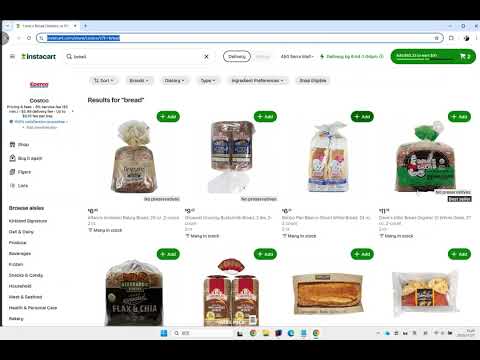](https://youtu.be/rJzXNXH3Gwk)
📺 Bilibili:
[https://www.bilibili.com/video/BV1fXUzBFE4L](https://www.bilibili.com/video/BV1fXUzBFE4L)
---
## 🚀 Quick Start
**Prerequisites**: Java 17+
1. **Clone the repository**
```shell
git clone https://github.com/platonai/browser4.git
cd browser4
```
2. **Configure your LLM API key**
> Edit [application.properties](application.properties) and add your API key.
3. **Build the project**
```shell
./mvnw -DskipTests
```
4. **Run examples**
```shell
./mvnw -pl examples/browser4-examples exec:java -D"exec.mainClass=ai.platon.pulsar.examples.agent.Browser4AgentKt"
```
If you have encoding problem on Windows:
```shell
./bin/run-examples.ps1
```
Explore and run examples in the `browser4-examples` module to see Browser4 in action.
For Docker deployment, see our [Docker Hub repository](https://hub.docker.com/r/galaxyeye88/browser4).
**Windows Users**: You can also build Browser4 as a standalone Windows installer. See the [Windows Installer Guide](browser4/browser4-agents/README.md) for details.
---
## 💡 Usage Examples
### Browser Agents
Autonomous agents that understand natural language instructions and execute complex browser workflows.
```kotlin
val agent = AgenticContexts.getOrCreateAgent()
val task = """
1. go to amazon.com
2. search for pens to draw on whiteboards
3. compare the first 4 ones
4. write the result to a markdown file
"""
agent.run(task)
```
### Workflow Automation
Low-level browser automation & data extraction with fine-grained control.
**Features:**
- Both live DOM access and offline snapshot parsing
- Direct and full Chrome DevTools Protocol (CDP) control, coroutine safe
- Precise element interactions (click, scroll, input)
- Fast data extraction using CSS selectors/XPath
```kotlin
val session = AgenticContexts.getOrCreateSession()
val agent = session.companionAgent
val driver = session.getOrCreateBoundDriver()
// Load the initial page referenced by your input URL
var page = session.open(url)
// Drive the browser with natural-language instructions
agent.act("scroll to the comment section")
// Read the first matching comment node directly from the live DOM
val content = driver.selectFirstTextOrNull("#comments")
// Snapshot the page to an in-memory document for offline parsing
var document = session.parse(page)
// Map CSS selectors to structured fields in one call
var fields = session.extract(document, mapOf("title" to "#title"))
// Let the companion agent execute a multi-step navigation/search flow
val history = agent.run(
"Go to amazon.com, search for 'smart phone', open the product page with the highest ratings"
)
// Capture the updated browser state back into a PageSnapshot
page = session.capture(driver)
document = session.parse(page)
// Extract additional attributes from the captured snapshot
fields = session.extract(document, mapOf("ratings" to "#ratings"))
```
### LLM + X-SQL
Ideal for high-complexity data-extraction pipelines with multiple-dozen entities and several hundred fields per entity.
**Benefits:**
- Extract 10x more entities and 100x more fields compared to traditional methods
- Combine LLM intelligence with precise CSS selectors/XPath
- SQL-like syntax for familiar data queries
```kotlin
val context = AgenticContexts.create()
val sql = """
select
llm_extract(dom, 'product name, price, ratings') as llm_extracted_data,
dom_first_text(dom, '#productTitle') as title,
dom_first_text(dom, '#bylineInfo') as brand,
dom_first_text(dom, '#price tr td:matches(^Price) ~ td, #corePrice_desktop tr td:matches(^Price) ~ td') as price,
dom_first_text(dom, '#acrCustomerReviewText') as ratings,
str_first_float(dom_first_text(dom, '#reviewsMedley .AverageCustomerReviews span:contains(out of)'), 0.0) as score
from load_and_select('https://www.amazon.com/dp/B08PP5MSVB -i 1s -njr 3', 'body');
"""
val rs = context.executeQuery(sql)
println(ResultSetFormatter(rs, withHeader = true))
```
Example code:
* [X-SQL to scrape 100+ fields from an Amazon's product page](https://github.com/platonai/exotic-amazon/tree/main/src/main/resources/sites/amazon/crawl/parse/sql/crawl)
* [X-SQLs to crawl all types of Amazon webpages](https://github.com/platonai/exotic-amazon/tree/main/src/main/resources/sites/amazon/crawl/parse/sql/crawl)
### High-Speed Parallel Processing
Achieve extreme throughput with parallel browser control and smart resource optimization.
**Performance:**
- 10k ~ 20k complex page visits per machine per day
- Concurrent session management
- Resource blocking for faster page loads
```kotlin
val args = "-refresh -dropContent -interactLevel fastest"
val blockingUrls = listOf("*.png", "*.jpg")
val links = LinkExtractors.fromResource("urls.txt")
.map { ListenableHyperlink(it, "", args = args) }
.onEach {
it.eventHandlers.browseEventHandlers.onWillNavigate.addLast { page, driver ->
driver.addBlockedURLs(blockingUrls)
}
}
session.submitAll(links)
```
🎬 YouTube:
[](https://www.youtube.com/watch?v=_BcryqWzVMI)
📺 Bilibili:
[https://www.bilibili.com/video/BV1kM2rYrEFC](https://www.bilibili.com/video/BV1kM2rYrEFC)
---
### Auto Extraction
Automatic, large-scale, high-precision field discovery and extraction powered by self-/unsupervised machine learning — no LLM API calls, no tokens, deterministic and fast.
**What it does:**
- Learns every extractable field on item/detail pages (often dozens to hundreds) with high precision.
- Open source when browser4 has 10K stars on GitHub.
**Why not just LLMs?**
- LLM extraction adds latency, cost, and token limits.
- ML-based auto extraction is local, reproducible, and scalable to 100k+ ~ 200k pages/day.
- You can still combine both: use Auto Extraction for structured baseline + LLM for semantic enrichment.
**Quick Commands (PulsarRPAPro):**
```bash
# NOTE: MongoDB required
curl -L -o PulsarRPAPro.jar https://github.com/platonai/PulsarRPAPro/releases/download/v4.6.0/PulsarRPAPro.jar
```
**Integration Status:**
- Available today via the companion project [PulsarRPAPro](https://github.com/platonai/PulsarRPAPro).
- Native Browser4 API exposure is planned; follow releases for updates.
**Key Advantages:**
- High precision: >95% fields discovered; majority with >99% accuracy (indicative on tested domains).
- Resilient to selector churn & HTML noise.
- Zero external dependency (no API key) → cost-efficient at scale.
- Explainable: generated selectors & SQL are transparent and auditable.
👽 Extract data with machine learning agents:

(Coming soon: richer in-repo examples and direct API hooks.)
---
## 📦 Modules Overview
| Module | Description |
|-------------------|---------------------------------------------------------|
| `pulsar-core` | Core engine: sessions, scheduling, DOM, browser control |
| `pulsar-agentic` | Agent implementation, MCP, and skill registration |
| `pulsar-rest` | Spring Boot REST layer & command endpoints |
| `browser4-spa` | Single Page Application for browser agents |
| `browser4-agents` | Agent & crawler orchestration with product packaging |
| `sdks` | Kotlin/Python SDKs plus tests and examples |
| `examples` | Runnable examples and demos |
| `pulsar-tests` | E2E & heavy integration & scenario tests |
---
## 📜 SDK
SDKs are available under `sdks/`, current language support includes:
- [Kotlin](sdks/browser4-sdk-kotlin) (native API, REST client)
- [Python](sdks/browser4-sdk-python) (REST client)
- [Node.js](sdks/browser4-sdk-nodejs) (REST client)
---
## ✨ Features
Status: [Available] in repo, [Experimental] in active iteration, [Planned] not in repo, [Indicative] performance target.
### AI & Agents
- [Available] Problem-solving autonomous browser agents
- [Available] Parallel agent sessions
- [Experimental] LLM-assisted page understanding & extraction
### Browser Automation & RPA
- [Available] Workflow-based browser actions
- [Available] Precise coroutine-safe control (scroll, click, extract)
- [Available] Flexible event handlers & lifecycle management
### Data Extraction & Query
- [Available] One-line data extraction commands
- [Available] X-SQL extended query language for DOM/content
- [Experimental] Structured + unstructured hybrid extraction (LLM & ML & selectors)
### Performance & Scalability
- [Available] High-efficiency parallel page rendering
- [Available] Block-resistant design & smart retries
- [Indicative] 100,000+ complex pages/day on modest hardware
### Stealth & Reliability
- [Experimental] Advanced anti-bot techniques
- [Available] Proxy rotation via `PROXY_ROTATION_URL`
- [Available] Resilient scheduling & quality assurance
### Developer Experience
- [Available] Simple API integration (REST, native, text commands)
- [Available] Rich configuration layering
- [Available] Clear structured logging & metrics
### Storage & Monitoring
- [Available] Local FS & MongoDB support (extensible)
- [Available] Comprehensive logs & transparency
---
## 🤝 Support & Community
Join our community for support, feedback, and collaboration!
- **GitHub Discussions**: Engage with developers and users.
- **Issue Tracker**: Report bugs or request features.
- **Social Media**: Follow us for updates and news.
We welcome contributions! See [CONTRIBUTING.md](CONTRIBUTING.md) for details.
---
## 📜 Documentation
Comprehensive documentation is available in the `docs/` directory and on our [GitHub Pages site](https://platonai.github.io/browser4/).
---
## 🔧 Proxies - Unblock Websites
<details>
Set the environment variable PROXY_ROTATION_URL to the URL provided by your proxy service:
```shell
export PROXY_ROTATION_URL=https://your-proxy-provider.com/rotation-endpoint
```
Each time the rotation URL is accessed, it should return a response containing one or more fresh proxy IPs.
Ask your proxy provider for such a URL.
</details>
---
## License
Apache 2.0 License. See [LICENSE](LICENSE) for details.
---
## 🤝 Support & Community
- 💬 WeChat: galaxyeye
- 🌐 Weibo: [galaxyeye](https://weibo.com/galaxyeye)
- 📧 Email: galaxyeye@live.cn, ivincent.zhang@gmail.com
- 🐦 Twitter: [galaxyeye8](https://x.com/galaxyeye8)
- 🌍 Website: [browser4.io](https://browser4.io)
<div style="display: flex;">
<img src="docs/images/wechat-author.png" width="300" height="365" alt="微信二维码" />
</div>