⭐ 145 Stars
🍴 15 Forks
👀 145 Watchers
Rust
mit
| GitHub 链接 | https://github.com/moltis-org/moltis |
|---|---|
| 项目简介 | A personal AI assistant built in Rust. Single binary, multi-provider LLMs, long-term memory, sandboxed execution, voice, MCP tools, and multi-channel access (web, Telegram, API). |
| 创建时间 | 2026-01-30 |
| 更新时间 | 2026-02-13 |
📖 README
English
<div align="center">
<a href="https://moltis.org"><img src="https://raw.githubusercontent.com/moltis-org/moltis-website/main/favicon-512.svg" alt="Moltis" width="120"></a>
# Moltis
**A personal AI gateway written in Rust. One binary, no runtime, no npm.**
[](https://github.com/moltis-org/moltis/actions/workflows/ci.yml)
[](https://codecov.io/gh/moltis-org/moltis)
[](https://codspeed.io/moltis-org/moltis)
[](LICENSE)
[](https://www.rust-lang.org)
<!-- [](https://discord.gg/t873en2E) -->
[Features](#features) • [Installation](#installation) • [Build](#build) • [Cloud Deployment](#cloud-deployment) • [How It Works](#how-it-works) • [Hooks](#hooks) • [Discord](https://discord.gg/t873en2E)
</div>
---
Inspired by [OpenClaw](https://docs.openclaw.ai) — just build it and run it.
## Installation
```bash
# One-liner install script (macOS / Linux)
curl -fsSL https://www.moltis.org/install.sh | sh
# macOS / Linux via Homebrew
brew install moltis-org/tap/moltis
# Docker (multi-arch: amd64/arm64)
docker pull ghcr.io/moltis-org/moltis:latest
# Or build from source
cargo install moltis --git https://github.com/moltis-org/moltis
```
## Features
- **Multi-provider LLM support** — OpenAI Codex, GitHub Copilot, and Local
LLM through a trait-based provider architecture
- **Streaming responses** — real-time token streaming for a responsive user
experience, including when tools are enabled (tool calls stream argument
deltas as they arrive)
- **Communication channels** — Telegram integration with an extensible channel
abstraction for adding others
- **Web gateway** — HTTP and WebSocket server with a built-in web UI
- **Session persistence** — SQLite-backed conversation history, session
management, and per-session run serialization to prevent history corruption
- **Agent-level timeout** — configurable wall-clock timeout for agent runs
(default 600s) to prevent runaway executions
- **Sub-agent delegation** — `spawn_agent` tool lets the LLM delegate tasks to
child agent loops with nesting depth limits and tool filtering
- **Message queue modes** — `followup` (replay each queued message as a
separate run) or `collect` (concatenate and send once) when messages arrive
during an active run
- **Tool result sanitization** — strips base64 data URIs and long hex blobs,
truncates oversized results before feeding back to the LLM (configurable
limit, default 50 KB)
- **Memory and knowledge base** — embeddings-powered long-term memory
- **Skills** — extensible skill system with support for existing repositories
- **Hook system** — lifecycle hooks with priority ordering, parallel dispatch
for read-only events, circuit breaker, dry-run mode, HOOK.md-based discovery,
eligibility checks, bundled hooks (boot-md, session-memory, command-logger),
CLI management (`moltis hooks list/info`), and web UI for editing, enabling/disabling,
and reloading hooks at runtime
- **Web browsing** — web search (Brave, Perplexity) and URL fetching with
readability extraction and SSRF protection
- **Voice support** — Text-to-speech (TTS) and speech-to-text (STT) with
multiple cloud and local providers. Configure and manage voice providers
from the Settings UI.
- **Scheduled tasks** — cron-based task execution
- **OAuth flows** — built-in OAuth2 for provider authentication
- **TLS support** — automatic self-signed certificate generation
- **Observability** — OpenTelemetry tracing with OTLP export
- **MCP (Model Context Protocol) support** — connect to MCP tool servers over
stdio or HTTP/SSE (remote servers), with health polling, automatic restart
on crash (exponential backoff), and in-UI server config editing
- **Parallel tool execution** — when the LLM requests multiple tool calls in
one turn, they run concurrently via `futures::join_all`, reducing latency
- **Sandboxed execution** — Docker and Apple Container backends with pre-built
images, configurable packages, and per-session isolation
- **Authentication** — password and passkey (WebAuthn) authentication with
session cookies, API key support, and a first-run setup code flow
- **Endpoint throttling** — built-in per-IP request throttling for
unauthenticated traffic when auth is enforced, with strict limits for
password login attempts and sensible caps for API/WS traffic (`429` +
`Retry-After` on limit hit)
- **WebSocket security** — Origin validation to prevent Cross-Site WebSocket
Hijacking (CSWSH)
- **Onboarding wizard** — guided setup for agent identity (name, emoji,
creature, vibe, soul) and user profile
- **Config validation** — `moltis config check` validates the configuration
file, detects unknown/misspelled fields with suggestions, and reports
security warnings
- **Default config on first run** — writes a complete `moltis.toml` with all
defaults so you can edit packages and settings without recompiling
- **Random port per installation** — each fresh install picks a unique available
port, avoiding conflicts when multiple users run moltis on the same machine
- **Zero-config startup** — `moltis` runs the gateway by default; no subcommand
needed
- **Configurable directories** — `--config-dir` / `--data-dir` CLI flags and
`MOLTIS_CONFIG_DIR` / `MOLTIS_DATA_DIR` environment variables
- **Cloud deployment** — one-click deploy configs for Fly.io, DigitalOcean,
and Render with `--no-tls` flag for cloud TLS termination
- **Tailscale integration** — expose the gateway over your tailnet via Tailscale
Serve (private HTTPS) or Funnel (public HTTPS), with status monitoring and
mode switching from the web UI (optional `tailscale` feature flag)
## Build
```bash
# Clone and build
git clone https://github.com/moltis-org/moltis.git
cd moltis
cargo build --release
# Start the gateway (gateway is the default command)
cargo run --release
```
Open `https://moltis.localhost:3000`
### Running with Docker
Moltis uses Docker for sandboxed command execution — when the LLM runs shell
commands, they execute inside isolated containers. When running Moltis itself
in a container, you need to give it access to the host's container runtime.
```bash
# Docker / OrbStack
docker run -d \
--name moltis \
-p 13131:13131 \
-p 13132:13132 \
-v moltis-config:/home/moltis/.config/moltis \
-v moltis-data:/home/moltis/.moltis \
-v /var/run/docker.sock:/var/run/docker.sock \
ghcr.io/moltis-org/moltis:latest
# Podman (rootless)
podman run -d \
--name moltis \
-p 13131:13131 \
-p 13132:13132 \
-v moltis-config:/home/moltis/.config/moltis \
-v moltis-data:/home/moltis/.moltis \
-v /run/user/$(id -u)/podman/podman.sock:/var/run/docker.sock \
ghcr.io/moltis-org/moltis:latest
# Podman (rootful)
podman run -d \
--name moltis \
-p 13131:13131 \
-p 13132:13132 \
-v moltis-config:/home/moltis/.config/moltis \
-v moltis-data:/home/moltis/.moltis \
-v /run/podman/podman.sock:/var/run/docker.sock \
ghcr.io/moltis-org/moltis:latest
```
Open `https://localhost:13131` in your browser and complete the setup.
Moltis generates a self-signed TLS certificate on first run. To trust it and
remove browser warnings, download the CA certificate from
`http://localhost:13132/certs/ca.pem` and add it to your system trust store
(Keychain on macOS, `update-ca-certificates` on Linux).
**Important notes:**
- **Socket mount is required** — Without mounting the container runtime socket,
Moltis cannot execute sandboxed commands. The agent will still work for
chat-only interactions, but any tool that runs shell commands will fail.
- **Security consideration** — Mounting the Docker socket gives the container
full access to the Docker daemon. This is necessary for Moltis to create
sandbox containers. Only run Moltis containers from trusted sources.
- **OrbStack** — Works identically to Docker; use the same socket path
(`/var/run/docker.sock`).
- **Podman** — Moltis talks to the Podman socket using the Docker API
(Podman's compatibility layer). Use the rootless socket path
(`/run/user/$(id -u)/podman/podman.sock`) or rootful path
(`/run/podman/podman.sock`) depending on your setup. You may need to enable
the Podman socket service: `systemctl --user enable --now podman.socket`
- **Persistence** — Mount volumes to preserve data across container restarts:
- `/home/moltis/.config/moltis` — configuration (moltis.toml, mcp-servers.json)
- `/home/moltis/.moltis` — data (databases, sessions, memory)
## Cloud Deployment
Deploy the pre-built Docker image to your favorite cloud provider:
| Provider | Deploy |
|----------|--------|
| DigitalOcean | [](https://cloud.digitalocean.com/apps/new?repo=https://github.com/moltis-org/moltis/tree/main) |
<!-- | Render | [](https://render.com/deploy?repo=https://github.com/moltis-org/moltis) | -->
<!-- TODO: Railway deploy does not work yet
| Railway | [](https://railway.com/new/template?repo=moltis-org/moltis) |
-->
**Fly.io** (CLI):
```bash
fly launch --image ghcr.io/moltis-org/moltis:latest
fly secrets set MOLTIS_PASSWORD="your-password"
```
All cloud configs use `--no-tls` because the provider handles TLS termination.
See [Cloud Deploy docs](https://docs.moltis.org/cloud-deploy.html) for
per-provider setup details, persistent storage notes, and authentication.
## How It Works
Moltis is a **local-first AI gateway** — a single Rust binary that sits
between you and multiple LLM providers. Everything runs on your machine; no
cloud relay required.
```
┌─────────────┐ ┌─────────────┐ ┌─────────────┐
│ Web UI │ │ Telegram │ │ Discord │
└──────┬──────┘ └──────┬──────┘ └──────┬──────┘
│ │ │
└────────┬───────┴────────┬───────┘
│ WebSocket │
▼ ▼
┌─────────────────────────────────┐
│ Gateway Server │
│ (Axum · HTTP · WS · Auth) │
├─────────────────────────────────┤
│ Chat Service │
│ ┌───────────┐ ┌─────────────┐ │
│ │ Agent │ │ Tool │ │
│ │ Runner │◄┤ Registry │ │
│ └─────┬─────┘ └─────────────┘ │
│ │ │
│ ┌─────▼─────────────────────┐ │
│ │ Provider Registry │ │
│ │ Multiple providers │ │
│ │ (Codex · Copilot · Local)│ │
│ └───────────────────────────┘ │
├─────────────────────────────────┤
│ Sessions │ Memory │ Hooks │
│ (JSONL) │ (SQLite)│ (events) │
└─────────────────────────────────┘
│
┌───────▼───────┐
│ Sandbox │
│ Docker/Apple │
│ Container │
└───────────────┘
```
### Gateway startup
When `moltis gateway` runs, it loads `moltis.toml`, initializes the credential
store (passwords, passkeys, API keys), registers LLM providers and tools,
discovers hooks and skills, optionally starts the memory manager, and
pre-builds a sandbox image if configured. An Axum HTTP server then listens for
WebSocket and REST connections.
### Message flow
1. **Connect** — A client (web UI, Telegram bot, API key bearer) opens a
WebSocket. The server validates auth and Origin headers, then assigns a
connection ID.
2. **Send** — The client calls the `chat.send` RPC method with message text
and an optional model override. The gateway resolves the session, persists
the user message to a JSONL file, loads conversation history, and builds a
system prompt (agent identity, project context, discovered skills).
3. **Agent loop** — If the chosen provider supports tool calling, an agent
loop runs (up to 25 iterations). Each iteration calls the LLM, inspects the
response for tool calls, fires `BeforeToolCall` / `AfterToolCall` hooks,
executes tools inside the sandbox, appends results, and loops until the LLM
produces a final text answer. If tools are not available, the provider
streams tokens directly.
4. **Broadcast** — Every step (thinking, tool start/end, text deltas, final
response) is broadcast over the WebSocket as sequenced events. The web UI
renders them in real time.
5. **Channel replies** — If the message originated from Telegram or another
channel, the final response is delivered back through that channel's
outbound interface.
### Sessions and memory
Conversations are stored as append-only JSONL files under
`~/.moltis/agents/<agent>/sessions/`. A SQLite database tracks metadata
(message counts, model selection, project bindings, channel bindings).
When token usage approaches 95% of the context window, the session is
auto-compacted: history is summarized and important facts are persisted to the
memory store.
The optional memory manager watches `memory/` directories for Markdown files,
chunks them by heading, embeds the chunks, and stores vectors in SQLite for
hybrid (vector + full-text) search. Memory context is injected into the system
prompt automatically.
### Hooks
Lifecycle hooks let you observe, modify, or block actions at key points.
Modifying events (`BeforeToolCall`, `BeforeCompaction`, `MessageSending`) run
sequentially — a hook can rewrite arguments or block execution. Read-only
events (`AfterToolCall`, `SessionEnd`, `GatewayStart`, …) run in parallel.
Hooks are discovered from `HOOK.md` files and include a circuit breaker that
auto-disables after repeated failures.
### Security model
Moltis applies defense in depth across several layers:
- **Authentication** — On first run a one-time setup code is printed to the
terminal. The user enters it to set a password or register a WebAuthn
passkey. Subsequent requests are authenticated via session cookies or API key
bearer tokens. Connections from loopback addresses (localhost, 127.0.0.1,
::1) are allowed without credentials as a safe default for local use.
- **WebSocket Origin validation** — The WebSocket upgrade handler rejects
cross-origin requests to prevent Cross-Site WebSocket Hijacking (CSWSH). A
malicious webpage cannot connect to your local gateway from the browser.
- **SSRF protection** — The `web_fetch` tool resolves DNS before making HTTP
requests and blocks any target IP in loopback, private, link-local, or CGNAT
ranges. This prevents the LLM from reaching internal services.
- **Secret handling** — Passwords, API keys, and tokens are stored as
`secrecy::Secret<String>`, which redacts `Debug` output, prevents accidental
`Display`, and zeroes memory on drop. Environment variable values injected
into sandbox sessions are redacted from command output (including base64 and
hex encoded forms).
- **No unsafe code** — `unsafe_code` is denied workspace-wide. The only
exception is an opt-in FFI wrapper behind the `local-embeddings` feature flag.
- **Hook gating** — `BeforeToolCall` hooks can inspect, modify, or block any
tool invocation before it executes, giving you a programmable policy layer
over what the agent is allowed to do.
### Sandboxed execution
User commands never run directly on the host. They execute inside isolated
containers using either Docker or Apple Container as the backend.
At startup the gateway builds a deterministic image from the configured base
image (`ubuntu:25.10` by default) and the package list in `moltis.toml`. The
image tag is a hash of the base image + sorted packages — if you add or remove
a package, the tag changes and a rebuild is triggered automatically.
Each command invocation gets a per-session container. Environment variables
configured for the agent are injected into the container, but their values are
redacted from any output the LLM sees (plain text, base64, and hex forms) to
prevent leaking secrets through tool results.
## Getting Started
### Build
```bash
cargo build # Debug build
cargo build --release # Optimized build
```
### Run
```bash
cargo run # Start the gateway server (default command)
```
On first run, a setup code is printed to the terminal. Open the web UI and
enter this code to set your password or register a passkey.
Optional flags:
```bash
cargo run -- --config-dir /path/to/config --data-dir /path/to/data
```
### Test
```bash
cargo test --all-features
```
## Hooks
Moltis includes a hook dispatch system that lets you react to lifecycle events
with native Rust handlers or external shell scripts. Hooks can observe, modify,
or block actions.
### Events
`BeforeToolCall`, `AfterToolCall`, `BeforeAgentStart`, `AgentEnd`,
`MessageReceived`, `MessageSending`, `MessageSent`, `BeforeCompaction`,
`AfterCompaction`, `ToolResultPersist`, `SessionStart`, `SessionEnd`,
`GatewayStart`, `GatewayStop`, `Command`
### Hook discovery
Hooks are discovered from `HOOK.md` files in these directories (priority order):
1. `<workspace>/.moltis/hooks/<name>/HOOK.md` — project-local
2. `~/.moltis/hooks/<name>/HOOK.md` — user-global
Each `HOOK.md` uses TOML frontmatter:
```toml
+++
name = "my-hook"
description = "What it does"
events = ["BeforeToolCall"]
command = "./handler.sh"
timeout = 5
[requires]
os = ["darwin", "linux"]
bins = ["jq"]
env = ["SLACK_WEBHOOK_URL"]
+++
```
### CLI
```bash
moltis hooks list # List all discovered hooks
moltis hooks list --eligible # Show only eligible hooks
moltis hooks list --json # JSON output
moltis hooks info <name> # Show hook details
```
### Bundled hooks
- **boot-md** — reads `BOOT.md` from workspace on `GatewayStart`
- **session-memory** — saves session context on `/new` command
- **command-logger** — logs all `Command` events to JSONL
### Shell hook protocol
Shell hooks receive the event payload as JSON on stdin and communicate their
action via exit code and stdout:
| Exit code | Stdout | Action |
|-----------|--------|--------|
| 0 | (empty) | Continue |
| 0 | `{"action":"modify","data":{...}}` | Replace payload data |
| 1 | — | Block (stderr used as reason) |
### Configuration
```toml
[[hooks]]
name = "audit-tool-calls"
command = "./examples/hooks/log-tool-calls.sh"
events = ["BeforeToolCall"]
[[hooks]]
name = "block-dangerous"
command = "./examples/hooks/block-dangerous-commands.sh"
events = ["BeforeToolCall"]
timeout = 5
[[hooks]]
name = "notify-discord"
command = "./examples/hooks/notify-discord.sh"
events = ["SessionEnd"]
env = { DISCORD_WEBHOOK_URL = "https://discord.com/api/webhooks/..." }
```
See `examples/hooks/` for ready-to-use scripts (logging, blocking dangerous
commands, content filtering, agent metrics, message audit trail,
Slack/Discord notifications, secret redaction, session saving).
### Sandbox Image Management
```bash
moltis sandbox list # List pre-built sandbox images
moltis sandbox build # Build image from configured base + packages
moltis sandbox clean # Remove all pre-built sandbox images
moltis sandbox remove <tag> # Remove a specific image
```
The gateway pre-builds a sandbox image at startup from the base image
(`ubuntu:25.10`) plus the packages listed in `moltis.toml`. Edit the
`[tools.exec.sandbox] packages` list and restart — a new image with a
different tag is built automatically.
## Project Structure
Moltis is organized as a Cargo workspace with the following crates:
| Crate | Description |
|-------|-------------|
| `moltis` | Command-line interface and entry point |
| `moltis-gateway` | HTTP/WebSocket server and web UI |
| `moltis-agents` | LLM provider integrations |
| `moltis-channels` | Communication channel abstraction |
| `moltis-telegram` | Telegram integration |
| `moltis-config` | Configuration management |
| `moltis-sessions` | Session persistence |
| `moltis-memory` | Embeddings-based knowledge base |
| `moltis-skills` | Skill/plugin system |
| `moltis-mcp` | MCP client, transport, and tool bridge |
| `moltis-plugins` | Plugin formats, hook handlers, and shell hook runtime |
| `moltis-tools` | Tool/function execution |
| `moltis-routing` | Message routing |
| `moltis-projects` | Project/workspace management |
| `moltis-onboarding` | Onboarding wizard and identity management |
| `moltis-oauth` | OAuth2 flows |
| `moltis-protocol` | Serializable protocol definitions |
| `moltis-common` | Shared utilities |
## Star History
[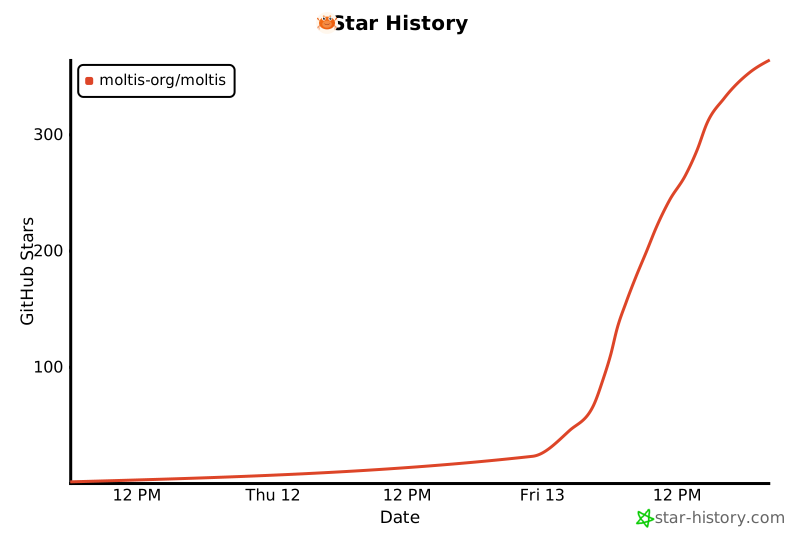](https://star-history.com/#moltis-org/moltis&Date)
## License
MIT